> ## Documentation Index
> Fetch the complete documentation index at: https://flowstate-577c2668.mintlify.site/llms.txt
> Use this file to discover all available pages before exploring further.
# Chat
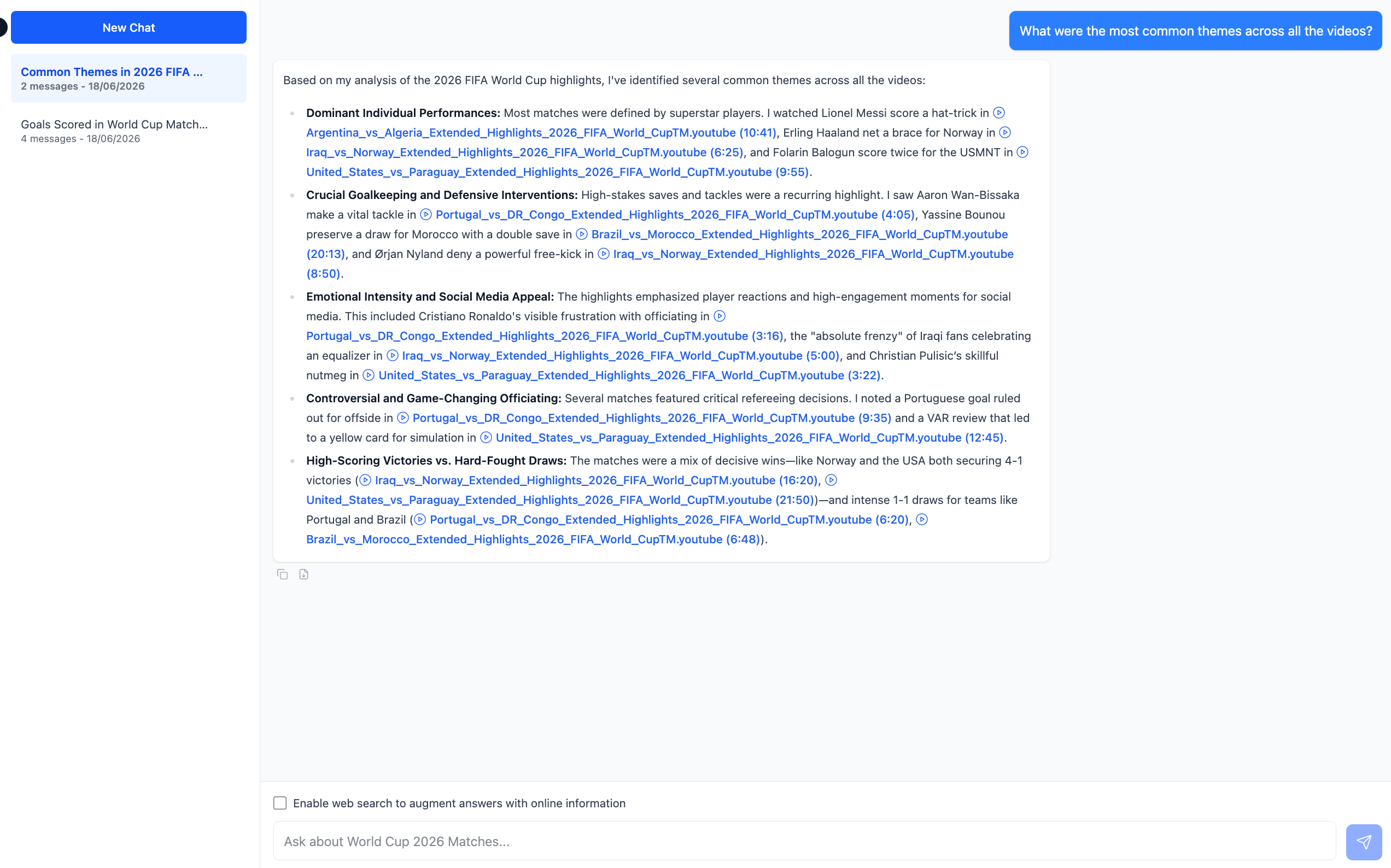
**Chat** lets you interact with everything the AI Watcher found across your workflow. Instead of opening each video individually, you can ask questions across the entire batch and get answers quickly.
Use Chat to ask questions such as:
* "What were the most common themes across all the videos?"
* "Which video had the most mentions of pricing?"
* "Summarize the key moments from the last three videos."
* "Which video scored highest and why?"
Click **New Chat** to start a conversation. Check **Search the Web** to let Flowstate pull in external information alongside your video content.
 > **Note:** Chat reasons across all videos in the workflow, so the more videos you have watched, the more it has to work with. If you have not run the AI Watcher yet, Chat will have no output to reason across.
This documentation is built and hosted on [Mintlify](https://mintlify.com), a developer documentation platform.
> **Note:** Chat reasons across all videos in the workflow, so the more videos you have watched, the more it has to work with. If you have not run the AI Watcher yet, Chat will have no output to reason across.
This documentation is built and hosted on [Mintlify](https://mintlify.com), a developer documentation platform.